
How To Leave a Voicemail Without Calling
Yes, you can, and their phone never rings. Here's the answer in 3 steps, plus 200 free voicemails to try it.
How to leave a voicemail without calling
Use ringless voicemail: it puts your message straight into their voicemail box, and the phone never rings.
- 1Record it once
Say your message, or clone your voice from a 30-second sample.
- 2Add the numbers
Upload a CSV or sync your CRM. Every number is checked first.
- 3Send
It lands as a normal new voicemail. Their phone never rings.
Every new account gets $20 in free credits.
Only need to reach one person, once? See the one-off options.
Rings on the recipient's phone
To clone your voice before your first send
More callbacks than cold SMS for warm contacts
Can You Leave a Voicemail Without Calling Someone?
Yes. Ringless voicemail (RVM) uses a server-to-server protocol to place your recorded message directly into the recipient's carrier voicemail box - bypassing the phone's call stack entirely. The device never rings; the recipient simply receives a standard voicemail notification when they next check their phone.
This is how thousands of sales teams, real estate agents, nonprofits, and businesses send outreach at scale. Rather than dialing and hoping for a pickup, you drop a concise, personalized message that recipients hear on their own schedule - turning cold outreach into warm, inbound conversations.
Sending one message to one person rather than a list? The manual routes (carrier voicemail access steps, third-party dial-in numbers, and why *67 does not do what people think) are compared side by side in how to call a voicemail directly. For the channel overview, including pricing and consent rules, see ringless voicemail.
Send Your First Voicemails Without Calling, Step by Step
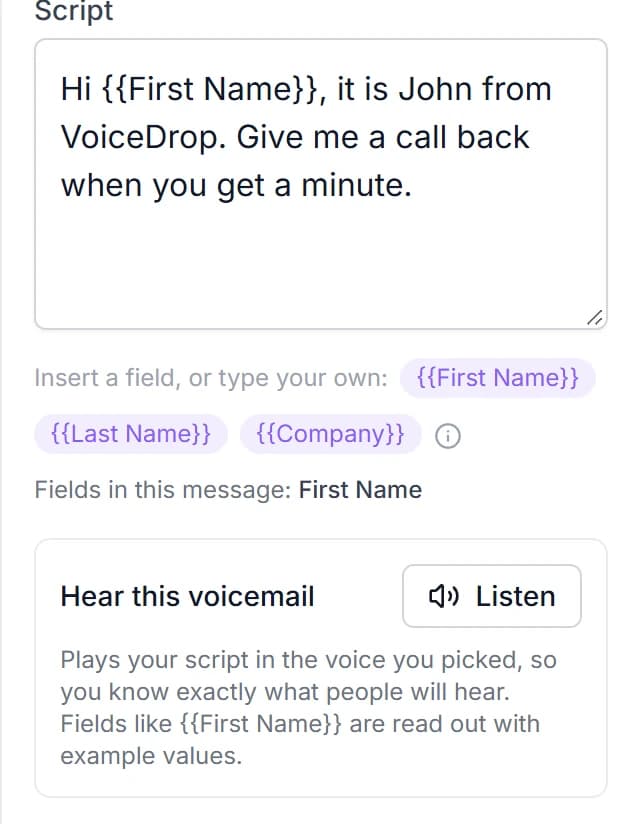
Step 1 - Clone or record your message. Use VoiceDrop's AI to clone your voice from a 30-second recording, or choose from a pre-built voice. Write a short script using personalization variables like the recipient's first name or company.
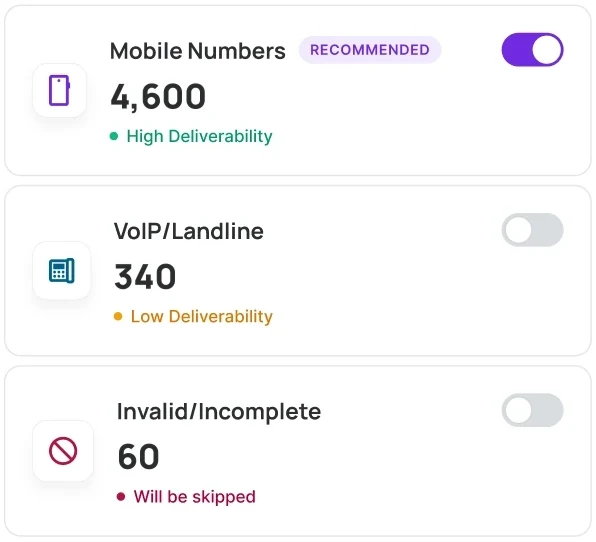
Step 2 - Upload your contact list. Import a CSV or sync your CRM. VoiceDrop validates every number and automatically scrubs Do-Not-Call lists before the campaign runs.
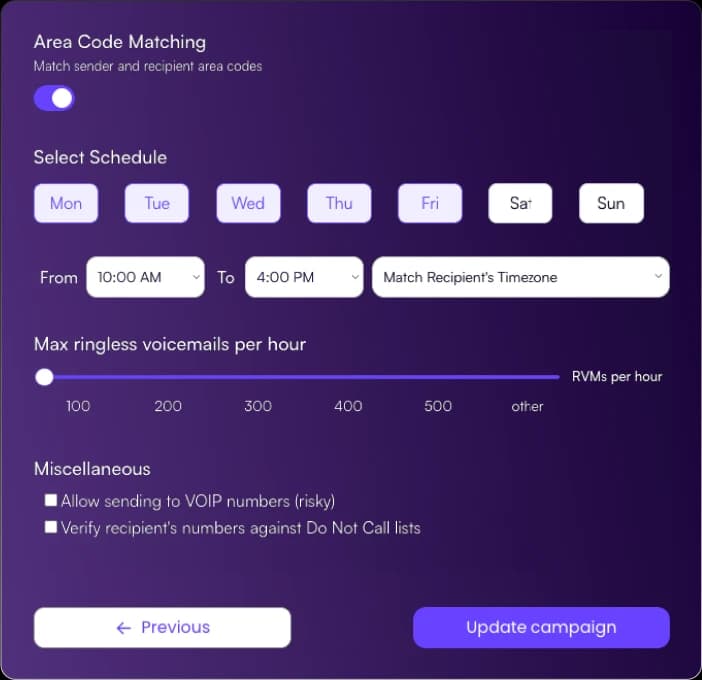
Step 3 - Schedule and send. Set a delivery window and time-zone preferences, then launch. VoiceDrop's carrier network places each message directly into the voicemail box - without dialing the recipient. You're charged only for successful deliveries.
Step 4 - Capture the callbacks. Recipients hear a personalized message in your voice and call back on their own terms. Route hot callbacks to your team or the AI Inbound Agent for immediate qualification.
Here is what those steps look like in VoiceDrop.
How to Leave a Voicemail Automatically
Schedule it once and let it run. You record the message one time, pick the list and the sending hours, and every voicemail goes out on its own, in your voice, with each contact's name merged in. Nobody dials and nobody waits on hold. Smart scheduling spreads the sends across time zones so each one arrives during business hours.
Want a text to follow the voicemail? Bulk SMS sends to the same list from the same account, and every reply lands in one shared team inbox.
On live sales calls the automatic version is a dialer voicemail drop: when a call reaches voicemail, one click plays your recording so the rep never repeats it. The guide compares both kinds side by side.
Everything you need to send voicemails without calling
AI voice cloning
Clone your voice in 30 seconds - every drop sounds personally recorded, even across thousands of sends.
Script personalization
Merge first name, company, or any custom field so each voicemail feels one-to-one, not broadcast.
DNC scrubbing
Automatic Do-Not-Call list validation before every campaign - stay compliant without manual checks.
Real-time analytics
Track delivery rates, listen rates, and callback rates per campaign, per contact, or per date range.
Multi-attempt delivery
Failed first attempts are automatically retried. You only pay when the voicemail lands successfully.
Two-way SMS follow-up
Add an SMS to your sequence so contacts who prefer texting can reply immediately.
Why Leave Voicemails Without Calling?
Non-intrusive outreach: because the phone never rings, recipients are never interrupted during a meeting, dinner, or sleep. They engage on their own schedule, which dramatically improves message reception and goodwill.
Scale without burnout: manually dialing to leave voicemails is slow and exhausting. A single campaign can deliver tens of thousands of personalized messages in the time it would take a rep to call a hundred people. Teams report three to five times the callbacks of cold SMS at comparable volume for warm contact lists.
Cost-effective reach: ringless voicemail costs far less per contact than live calling. VoiceDrop's pay-per-delivery model means you only spend money on messages that actually land in the voicemail box - failed sends cost nothing.
Frequently Asked Questions
Send your first 200 voicemails free
Every new account gets $20 in credits. No contracts, pay only for successful deliveries.